

Stop Misdirected Emails and Files with Prevent
The impact of email data loss
38%
of organizations experienced client churn
33%
of organizations suffered direct financial losses
86%
of incidents resulted in disciplinary or legal action against the employees involved
Outlook autocomplete is the leading cause of data loss
Misdirected emails and files are the leading cause of data loss incidents reported to regulators.
When people are under pressure, tired, or simply not concentrating, they make mistakes – such as choosing the wrong recipient via Outlook autocomplete or attaching the wrong files to an email.
The static data loss prevention (DLP) solutions delivered by Microsoft 365 and secure email gateways (SEG) don’t understand the anomalies in human behavior to detect accidental email data loss, and they can’t scale to deliver effective DLP for today’s enterprise.
93% of organizations have suffered and outbound email data breach
- Egress, a KnowBe4 Company research
Stop emailing the wrong people
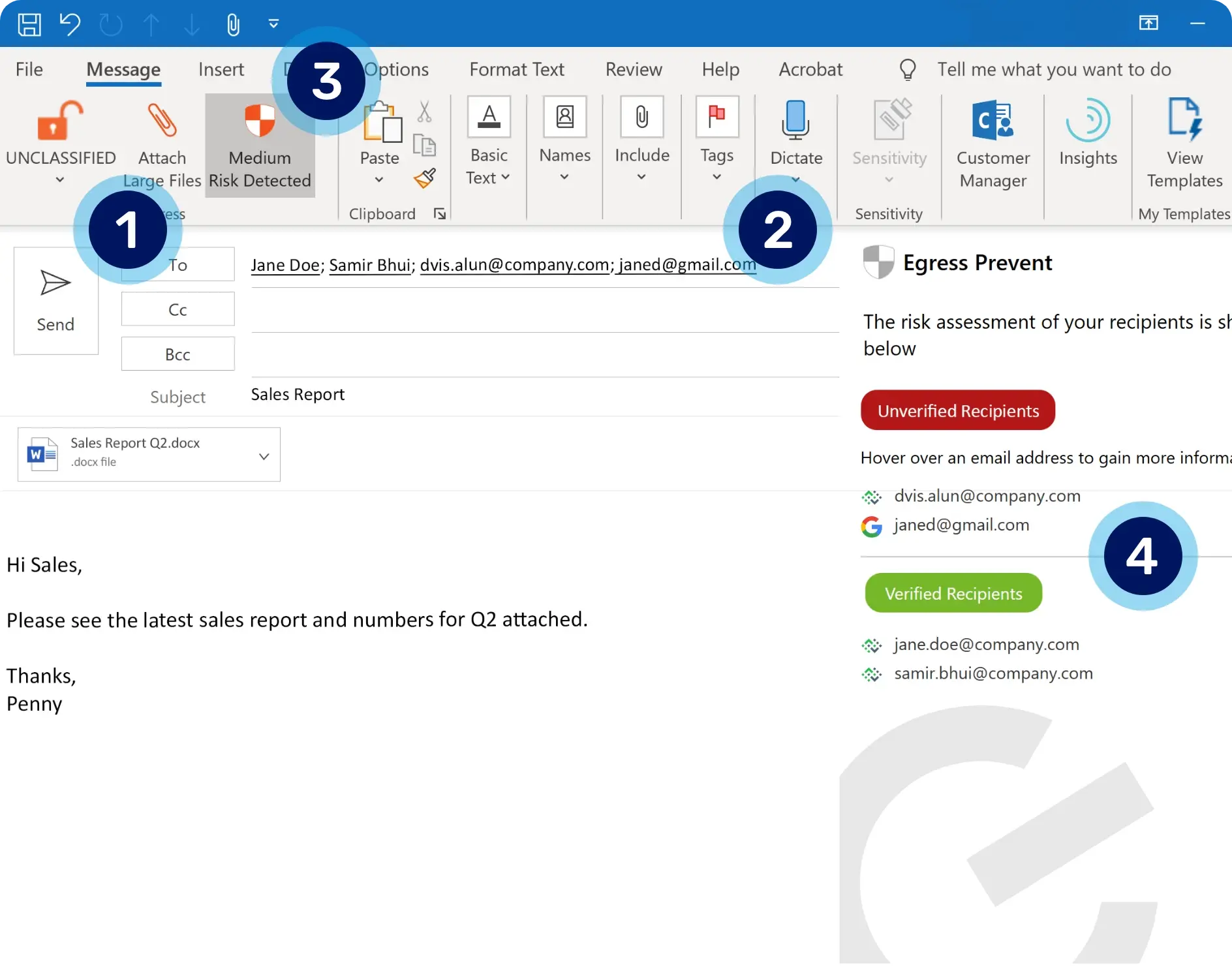
1. Recipient analysis. Social graphing and contextual machine learning algorithms deeply understand a user’s relationships to detect any anomalous recipients.
2. Domain analysis. Assesses historic domain interactions for authenticity in order to detect deviations from normal behavior or lookalike domains.
3. Interactive and customizable feedback. Egress Prevent provides instantaneous feedback as the user composes their message, without negatively impacting their workflow.
4. Clear explanation of risk. An interactive threat panel highlights why there’s a risk, augmenting your security awareness and training.

We’re really pleased with Defend. We’re now detecting a broader range of advanced phishing threats, including BEC and impersonation attacks.
Kevin Orritt, Cyber Security Manager, GMMH
Share the right content with recipients every time
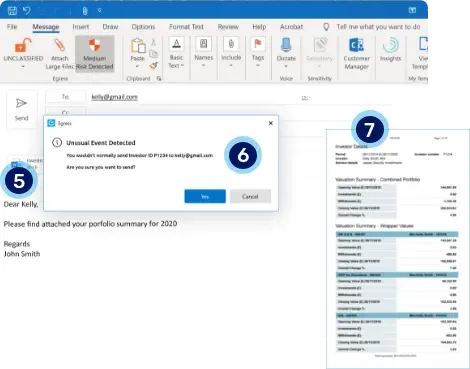
5. Content inspection and analysis for all attachments. DLP policies supervise machine learning algorithms to coach right vs. wrong. By measuring the subject line and message body against the given aliases, Prevent can detect anomalous content specific to the intended recipients and domains.
6. Intelligent notifications. An unobtrusive prompt only alerts users to a potential mistake, and our intelligent technology learns behavior for future emails.
7. Anomalous content detection inside the attachments. Smart rules work alongside machine learning to scan content buried inside an attachment and detect any unique identifiers that don’t match up with the intended recipients based on previous or similar user behavior.
Prevent misdirected emails at home or on the go
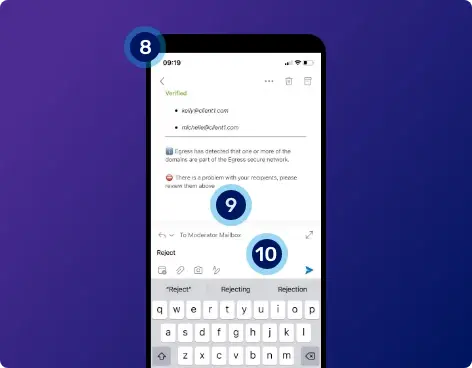
8. Immediate notification within the M365 environment. Your email is never diverted to a proprietary cloud, meaning it’s safe from unauthorized access while productivity remains intact in the event of an outage. Should we spot any risk of a misdirected send, our cutting-edge solution pushes a notification email back to the user.
9. Simple explanations of security risks. The email explains clearly why there’s a risk to help educate users and drive employee awareness on security best practice.
10. Quick approve/reject workflow. Our sophisticated mobile technology allows users to quickly reject emails in the even of a misdirected send; or they can approve, and the machine learns for next time.
Intelligent technology that's easy for users to understand
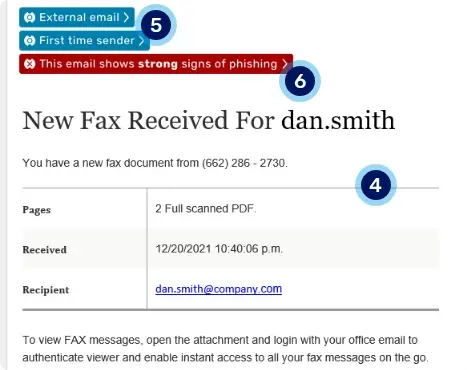
4. Linguistic analysis reveals anomalous content. Email structure and copy identifies it as a fax receipt notification, but this is the first time the recipient has received one.5. Blue alerts highlight the email's origins. Our blue banners let the recipient know they've received an external email from a new contact. Based on our analysis, a red warning is also added.
6. Red warning banner alerts user to real-time risk. As Defend has identified the email as a phish with a malicious payload, a red warning banner is dynamically added to alert the user.
Cut through the noise to highlight the risks that matter
Reporting on threats such as misdirected emails and files in your email flows can be manual and slow. Even worse, systems can throw too much unnecessary information at you, making it harder to make timely and effective decisions.
KnowBe4's intelligence platform provides simplified dashboards and critical insights so that administrators can quickly cut through the noise, identify email security risks, and, where necessary, remediate them.
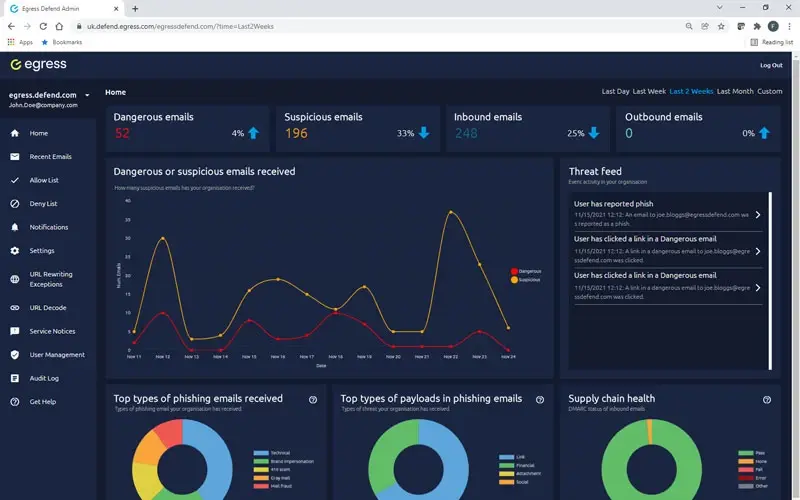
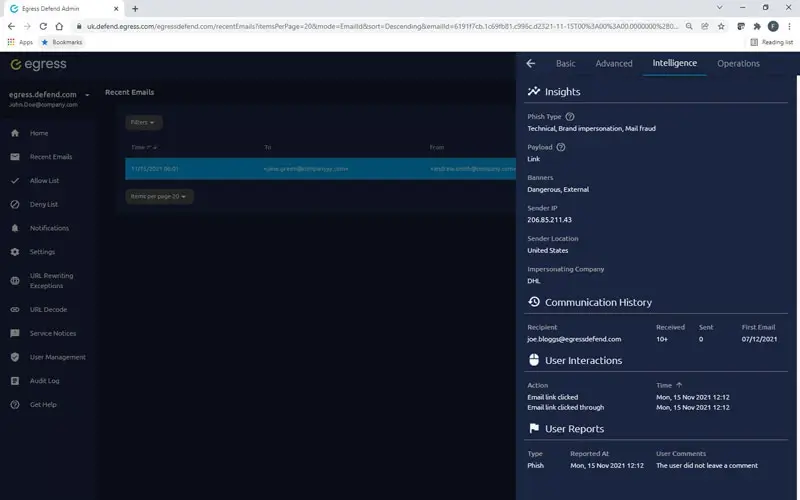
Actionable insights
Data and analytics should not overwhelm you with information. Augmented threat intelligence into supply chain health, attack types, and payload gives Security teams what they need to take decisive action that mitigates threats.