Stop Data Exfiltration with Prevent
The impact of data exfiltration
70%
of organizations have suffered a data breach from intentional exfiltration
20%
of CISOs say intentional exfiltration keeps them awake at night
27%
of organizations have lost data to employees moving jobs
Single incidents of intentional data exfiltration can have the greatest impact
Employees who intentionally exfiltrate data understand how to work around the policies and technical safeguards in place to steal valuable information or to inflict the most harm.
At the same time, organizations also suffer from non-malicious exfiltration from employees forwarding data and files to personal accounts to work on their own devices or print at home.
Traditional, static data loss prevention solutions, such as those provided by Microsoft 365 and secure email gateways (SEGs), are not intelligent enough to detect the subtle behavioral changes that people exhibit when exfiltrating data and prevent these incidents from occurring.
43% of CISOs say intentional exfiltration would have the greatest negative impact for their organization
- Egress, a KnowBe4 Company research
Automatically prevent data exfiltration over email
Security administrators can configure their risk appetite for data exfiltration and deploy KnowBe4 Prevent to either block activity or warn users when they are about to contravene policy or to transparently monitor user activity without end-user notification.
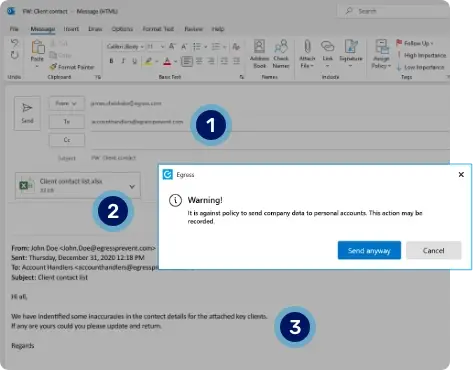
Intelligent detection of data exfiltration over email
1. Recipient analysis to detect exfiltration attempt. AI technology analyzes recipient(s) to detect signals that this may be a personal account linked to the sender.
2. Attachment analysis. Attachments are analyzed for sensitive content and verified against the intended recipient(s).
3. Message body analysis. The message body is analyzed for key behavioral signals and indications of exfiltration.

"We detect and warn staff on [data] exfiltration attempt from sending emails to their personal accounts."
Mahesh Belagali, Information Technology Security Manager, Wotton+Kearney
Admins are provided with total visibility of exfiltration attempts
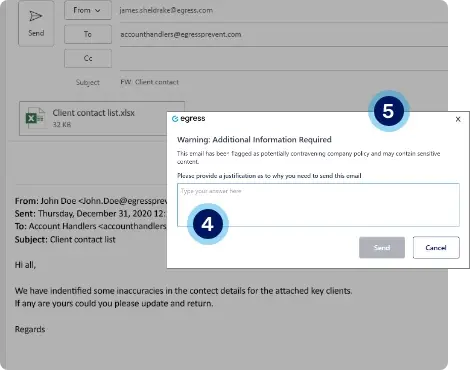
4. Customizable workflow. Administrators can also control and report on exfiltration incidents via a simple approve/reject workflow.
5. Branded prompts and justification. End-user prompts can be fully customized and include end-user feedback and justification requests that are audited for administrator review.
Intelligent technology that's easy for users to understand
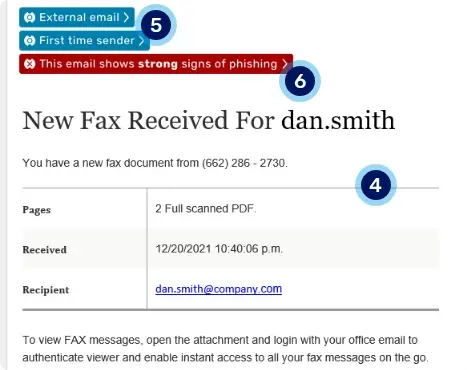
4. Linguistic analysis reveals anomalous content. Email structure and copy identifies it as a fax receipt notification, but this is the first time the recipient has received one.5. Blue alerts highlight the email's origins. Our blue banners let the recipient know they've received an external email from a new contact. Based on our analysis, a red warning is also added.
6. Red warning banner alerts user to real-time risk. As Defend has identified the email as a phish with a malicious payload, a red warning banner is dynamically added to alert the user.
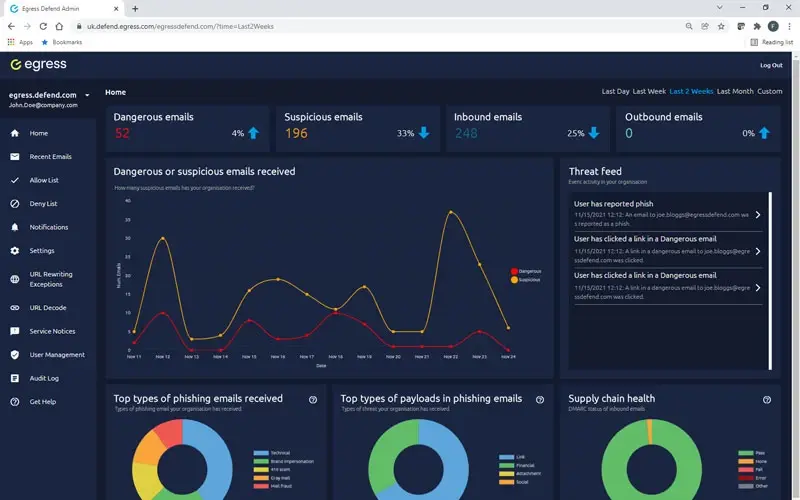
Cut through the noise to highlight the risks that matter
Reporting on threats such as data exfiltration in your email flows can be manual and slow. Even worse, systems can throw too much unnecessary information at you, making it harder to make timely and effective decisions.
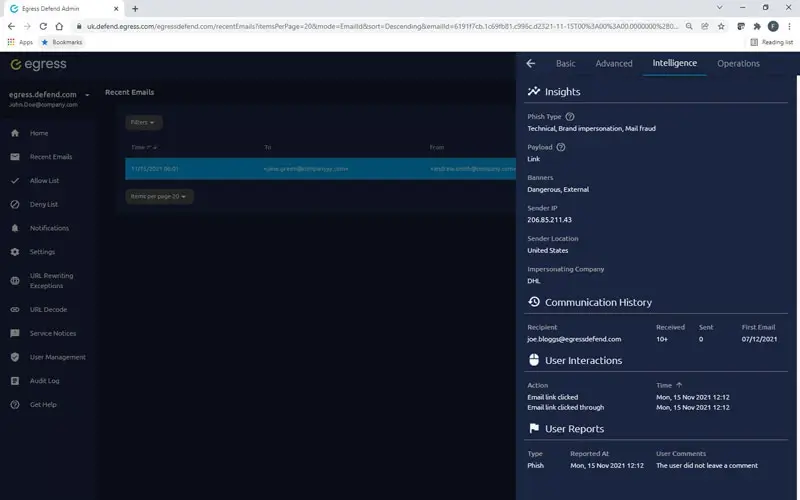
KnowBe4's intelligence platform provides simplified dashboards and critical insights so that administrators can quickly cut through the noise, identify email security risks, and, where necessary, remediate them.
Actionable insights
Data and analytics should not overwhelm you with information. Updated in real time, our intelligence dashboard offers insights and statistics into email details, risk levels, authentication checks, communication history, and how your people interacted with Prevent prompts.